
Quick Start
Quick start
Section titled “Quick start”1. Start the daemon and reload Fcitx5
Section titled “1. Start the daemon and reload Fcitx5”systemctl --user enable --now vinput-daemon.servicefcitx5 -r2. Enable in Fcitx5
Section titled “2. Enable in Fcitx5”Open Fcitx5 Configuration → Addons → Find Vinput → Enable.
3. Install a model
Section titled “3. Install a model”Open Vinput GUI (launch from your application menu, or run vinput-gui in a terminal).
Go to Resources → Models, browse the available models list and click Download to install one, then click Use to activate it.
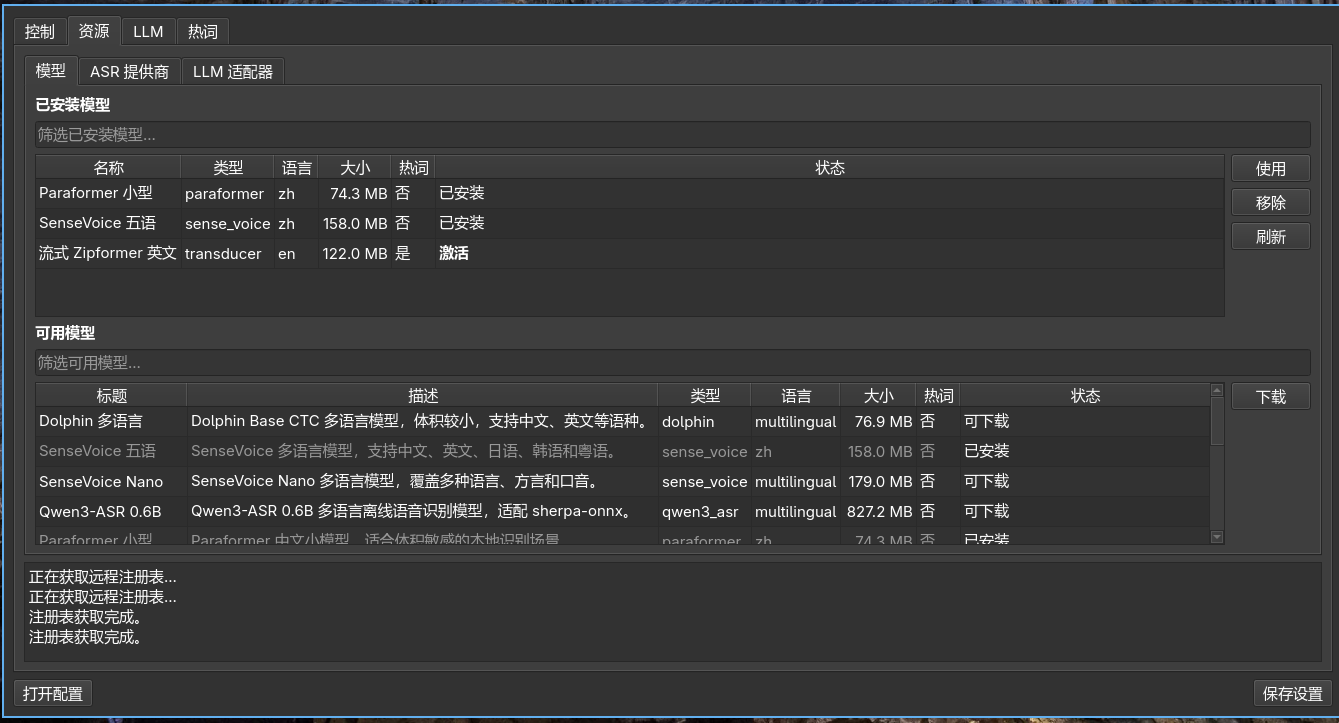
Or use the CLI:
vinput model list -a # Browse available modelsvinput model add <model-name> # Download and installvinput model use <model-name> # Set as active modelYou can also manually place a model directory in ~/.local/share/vinput/models/<model-name>/ containing:
vinput-model.jsonmodel.int8.onnxormodel.onnxtokens.txt
4. Start using
Section titled “4. Start using”- Tap
Alt_Rto start recording, tap again to stop and recognize - Hold
Alt_Rto record, release to recognize (push-to-talk)
ASR providers
Section titled “ASR providers”Besides the built-in local model, you can install cloud ASR providers for different speed, quality, or cost trade-offs.
In Vinput GUI, go to Resources → ASR Providers, browse available providers and click Install. Or use the CLI:
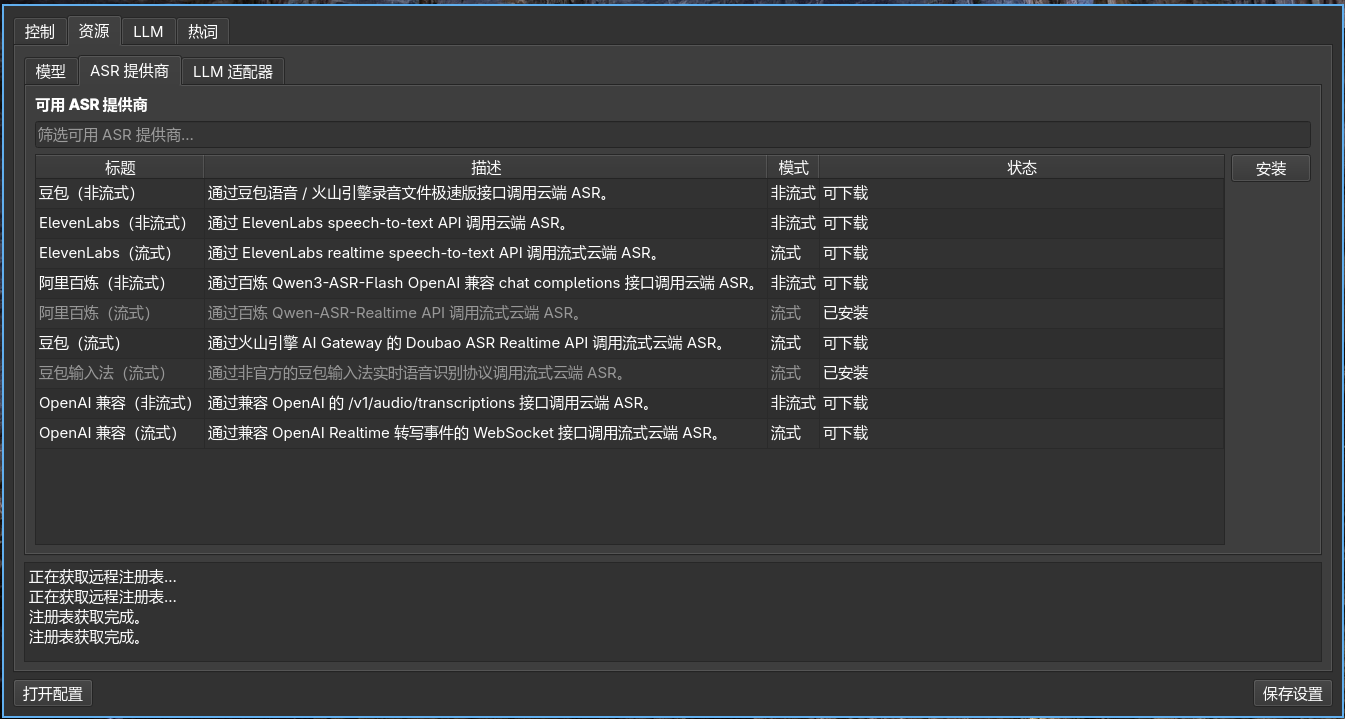
vinput provider list -a # List available remote ASR providersvinput provider add <id> # Install a provider from registryvinput provider use <id> # Switch active ASR providerPress F8 at any time to open the ASR provider / model switcher and switch between them on the fly.
Available cloud ASR providers include:
| Provider | Mode | Description |
|---|---|---|
| doubao | non-streaming | Doubao / Volcengine fast file recognition |
| ElevenLabs | non-streaming / streaming | ElevenLabs speech-to-text API |
| alibai (Aliyun Bailian) | non-streaming / streaming | Qwen3-ASR via OpenAI-compatible / Realtime API |
| doubao (streaming) | streaming | Doubao ASR Realtime via AI Gateway |
| doubao-ime (streaming) | streaming | Unofficial Doubao IME real-time protocol |
| OpenAI-compatible | non-streaming / streaming | OpenAI /v1/audio/transcriptions or Realtime WebSocket |
Key bindings
Section titled “Key bindings”| Key | Default | Function |
|---|---|---|
| Trigger Key | Alt_R | Tap to toggle recording; hold to push-to-talk |
| Command Key | Control_R | Hold after selecting text to modify with voice |
| ASR Menu Key | F8 | Open ASR provider / model switcher |
| Scene Menu Key | Shift_R | Open scene switcher |
| Page Up / Down | Page Up / Page Down | Navigate candidate list |
| Move | ↑ / ↓ | Move cursor in candidate list |
| Confirm | Enter | Confirm selected candidate |
| Cancel | Esc | Close menu |
| Quick Select | 1–9 | Quick-pick candidate |
All keys can be customized in Fcitx5 configuration.
Configuration files
Section titled “Configuration files”| File | Path |
|---|---|
| Plugin config (keybindings, etc.) | ~/.config/fcitx5/conf/vinput.conf |
| Core config (model, LLM, scenes) | ~/.config/vinput/config.json |
| Model directory | ~/.local/share/vinput/models/ |
| ASR provider scripts | ~/.local/share/vinput/providers/ |
| LLM adapter scripts | ~/.local/share/vinput/adapters/ |
Flatpak installs use different paths:
| File | Path |
|---|---|
| Plugin config | ~/.var/app/org.fcitx.Fcitx5/config/fcitx5/conf/vinput.conf |
| Core config | ~/.var/app/org.fcitx.Fcitx5/config/vinput/config.json |
| Model directory | ~/.var/app/org.fcitx.Fcitx5/data/vinput/models/ |
| ASR provider scripts | ~/.var/app/org.fcitx.Fcitx5/data/vinput/providers/ |
| LLM adapter scripts | ~/.var/app/org.fcitx.Fcitx5/data/vinput/adapters/ |